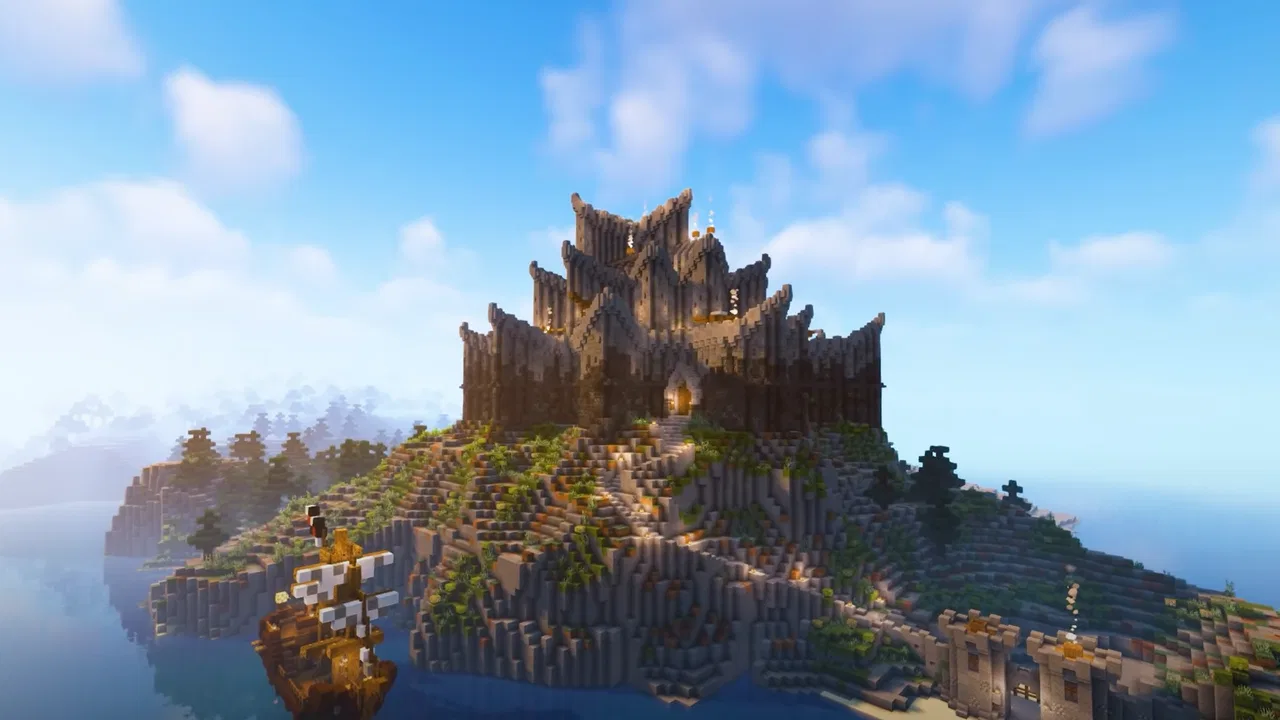
Craft World Block Building 3D
- 4.2
- Rating
- 10.00M
- Installs
- Free
- Price
 Analysis by App-foxy
When I tried Craft World Block Building 3D, the feature that stayed with me was its focus on building a personal city from simple blocks. That sounds straightforward, but it changes the game from a quick round-based distraction into a small creative project. I could decide what belonged in a neighborhood, where a road should run, and how much time I wanted to spend improving a single structure.
This is a free simulation game from Patane Global, aimed at Everyone and available for devices running Android 7.0 or later. Its store summary presents the idea clearly: build a world and explore a dream city. In practice, I found it most appealing when I treated that idea as a relaxed construction activity rather than expecting a deep management simulator or a demanding survival game.
The game has attracted more than ten million installs and holds an average rating of 4.1 from roughly sixty-one thousand ratings. Those figures suggest that the basic block-building formula has found a sizable audience, but they do not tell you whether it matches your preferred pace. My experience is that the answer depends heavily on whether you enjoy arranging spaces and making gradual visual improvements.
You May Also Like

 Blood Strike: 2.5 Anniversary
Blood Strike’s Loadouts Turn Every Drop Into a Tactical Gamble
A close look at Blood Strike’s custom loadouts: how fast access to signature weapons reshapes its battle royale rhythm, rewards preparation, and narrows the gap between fights.

 Pandora - Music & Podcasts
Pandora’s Music Is Easy to Start, but Harder to Recover
Pandora’s strength is its low-effort path from a seed to a station. Its weak spot is how much confidence it asks you to place in connection, setup, and quiet recovery.

 8 Ball Pool
 Is Built on Rivalries, Rematches, and Routine
A close look at the rivalries, rematches, shared routines, and unanswered safety questions that turn a quick pool match into a persistent mobile community.

 Samsung Music
’s Quiet Strength Is Playing What You Already Own
Its reach comes less from spectacle than from dependable access to a personal library. That simplicity is both the app’s strongest retention engine and its ceiling.

 AccuWeather: Weather Radar
AccuWeather Review: A Quick, Clear Forecast for Everyday Decisions
For everyday plans, the best forecast is the one you can understand quickly. AccuWeather makes rain timing, radar, and local conditions easy to act on, with a few trade-offs.

 Hill Climb Racing
Why Hill Climb Racing Still Turns Crashes Into One More Run
A tiny car, a bumpy hill and one more upgrade: Hill Climb Racing keeps resurfacing because its simple chaos makes every near-miss feel personal.
More From Our News Desk
View All News


Building a city is the real attraction
The central capability is the freedom to shape a city-like environment with block-based construction. Instead of following one narrow path, I could think in terms of places: a home, a street, a cluster of buildings, or an area that needed a different visual rhythm. That open-ended approach gives the game its strongest identity.
What makes this useful is not simply the ability to place blocks. It is the way a basic material becomes a planning tool. A building can be viewed as an isolated project, but it can also be part of a larger scene. I found myself considering spacing, entrances, empty areas, and whether nearby structures looked intentional together. That shift from “place the next block” to “improve the whole view” is where the simulation element becomes more satisfying.
I would not describe the experience as a detailed urban-planning simulator. The pleasure comes from visual creation and exploration, not from balancing budgets, traffic, residents, or complicated city services. If you want spreadsheets, economic pressure, and constant decisions about resources, this will feel light. If you want a calm digital space where you can experiment with layouts, the simpler approach is a benefit.
The block style also makes the game approachable. You do not need architectural knowledge to start, and an imperfect first building is not a disaster. I could test an idea, step back, and decide whether to extend it or start again. That low-risk experimentation is especially valuable on a phone, where I may only have a few minutes and do not want to study a complicated control system before creating anything.
How the construction loop feels in practice
My most useful habit was to begin with a small purpose for each session. Rather than trying to create an entire dream city immediately, I would choose one task: define a street, finish one building, or make two nearby structures feel connected. This kept the open-ended design from becoming vague. The game works better when I give myself a modest visual target.
Building in blocks naturally encourages a layered workflow. I first considered the footprint, then the height, and only afterward the surrounding space. If I decorated too early, I often had to undo the work when the main shape changed. Starting with the outline saved time and made later adjustments feel more deliberate.
Another practical lesson was to leave breathing room. Filling every available area can make a city look crowded and makes individual buildings harder to appreciate. Empty plots, wider paths, or a gap between tall structures can function as visual pauses. This is not a formal rule enforced by the game; it is simply the difference I noticed when comparing a rushed layout with one that I allowed to develop gradually.
Exploration matters because it gives context to the things you build. A structure can look fine when viewed up close but feel misplaced when seen as part of the wider environment. I recommend checking the surroundings regularly instead of staying focused on one wall or roof. That wider view helps reveal awkward spacing and makes the city feel more coherent.
For touch controls, I found that slower movements were more reliable than trying to make fast corrections. On a small screen, an energetic building session can become messy if I rush placement or rotate the view repeatedly. Taking a moment to line up the camera before adding a section reduced accidental changes and made the process less tiring.
The current version is 2008, and the game was released on February 24, 2025. I mention this because the experience feels like something to revisit rather than finish in one sitting. A city-building game benefits from returning with fresh eyes: a layout that seemed complete yesterday may reveal an obvious improvement after a break.
A realistic everyday use case
Imagine having fifteen minutes before leaving for work or school. A long strategy game would be inconvenient, while a competitive match might leave you feeling rushed. Here, you could open the city, extend one road, complete a small building, and stop at a natural point. The same project can be continued later without requiring a full evening of concentration.
I also see it working well as a quiet wind-down activity. After a busy day, I prefer a game that lets me make choices without punishing every mistake. The block-building format gives me something to focus on, while the city theme provides enough direction to prevent the experience from feeling completely empty.
For families, the Everyone age rating makes the concept easy to understand and share. A younger player might enjoy constructing individual buildings, while an older player could think about neighborhoods and overall composition. I would still suggest that adults try it first if they are choosing it for a child, because the appeal depends more on creative patience than on action or a clear sequence of levels.
Where it compares well with familiar alternatives
Compared with a traditional city-management game, this one puts less pressure on administration and more on direct construction. I do not have to begin by learning a complex economy to enjoy the central activity. That makes it a better fit for someone who wants to see an idea take shape quickly.
Compared with a survival-oriented block game, the emphasis feels more peaceful and design-led. Survival games often make gathering, danger, and progression the reason to build. Here, the appeal is the building itself and the chance to explore the space you create. Players who enjoy tension and constant objectives may find this less motivating, but players who dislike losing progress to danger may appreciate the calmer direction.
It also differs from a purely decorative sandbox because the city setting gives my work a sense of place. I am not only making disconnected objects; I am imagining how they sit beside one another. That context is a real strength, although it also means the experience can feel repetitive if I am not interested in planning larger scenes.
The trade-offs that shape the experience
The biggest trade-off is freedom versus structure. Open construction gives me room to experiment, but it does not always tell me what to do next. On days when I want a clear mission, a defined challenge, or a strong progression path, I may prefer another simulation game. This is a title I open with an idea in mind, not one that reliably supplies a detailed agenda.
The same simplicity that makes it accessible can limit long-term appeal for experienced builders. Someone looking for highly technical architecture, detailed resource chains, or complex civic systems may outgrow it. The game is strongest as a creative block-building space, not as a replacement for a full city-management experience.
There is also a patience cost. A satisfying city usually comes from small adjustments rather than one dramatic action. I had to accept that the best results were gradual: move a structure, rethink a road, leave an area open, then return later. If you want immediate spectacle every time you tap the screen, the slower creative rhythm may feel underpowered.
Phone size can affect comfort too. On a larger display, it is easier to judge distance and see how buildings relate to one another. On a smaller device, detailed placement can demand more camera movement and concentration. That does not make the game unusable, but it makes short, focused construction tasks more comfortable than ambitious city-wide edits.
Because the game is free, it is easy to try without committing money. I still recommend judging it by the quality of its building loop rather than by the promise of a huge city. The important question is whether you enjoy making your own goals. If you do, the free entry makes experimentation simple; if you need a strong campaign, the price alone will not solve that mismatch.
Small techniques that improve a build
One technique I found surprisingly helpful was to separate “infrastructure” from “showpiece” construction. I would first establish the basic shape of a neighborhood, even if it looked plain, and only then spend time on the building I wanted to stand out. This prevented one attractive structure from being surrounded by an unfinished layout.
A second technique was to use repetition carefully. Similar building shapes can make an area feel organized, but identical forms everywhere can make the city visually flat. I got better results by keeping a common pattern while changing height, spacing, or placement. The goal was not perfect uniformity; it was a recognizable neighborhood with enough variation to stay interesting.
I also learned to review a project from more than one distance. Close views help with individual walls and details, while a wider view reveals whether the whole composition works. Alternating between those perspectives is more effective than polishing one building for too long without checking its relationship to the rest of the city.
Finally, I recommend treating unfinished areas as intentional work zones instead of rushing to fill them. A partially developed section can help separate neighborhoods and leave room for a future idea. That approach is especially useful for players who tend to start several projects at once and then feel overwhelmed by a city full of half-completed structures.
Who will get the most from it
This is best for patient creative players who enjoy setting their own construction goals. It suits someone who likes visual organization, relaxed exploration, and the satisfaction of improving a place in small steps. It is also a good choice for a player who wants a simulation-flavored game that can be approached in short sessions without requiring a complicated tutorial.
It may appeal to younger players because the core idea is easy to grasp, and the Everyone rating supports that broad accessibility. Adults who enjoy miniature design projects can find more depth by planning districts, balancing open and built-up areas, and revisiting older work with a critical eye.
I would be more cautious about recommending it to players who need competition, social interaction, intense action, or a tightly written progression system. It is also not my first choice for someone seeking a serious urban simulator. In those cases, a more structured management game or a deeper survival-building alternative would probably provide stronger motivation.
The developer, Patane Global, has positioned the experience around a clear and approachable idea rather than a complicated set of systems. That clarity is part of its charm. I never felt that I needed to master a large rulebook before I could enjoy making something, but I also understood that the game would only remain interesting if I supplied some imagination of my own.
My recommendation after spending time with the city
Craft World Block Building 3D works because it makes creation immediately understandable: choose a direction, shape a structure, inspect the surroundings, and keep refining. Its strongest capability is not merely placing blocks; it is giving those blocks a setting where layout and personal taste matter.
I recommend it if you want a free, approachable simulation game for relaxed building sessions and you are comfortable creating your own objectives. Start with a small district, leave space between major structures, check your work from different views, and resist the urge to complete everything at once. Those habits make the city feel more intentional and help the open format stay rewarding.
My final view is positive but measured. The game offers a friendly creative sandbox, yet its light structure and gradual pace will not satisfy everyone. For players who enjoy turning a blank area into a city that reflects their own choices, it is an enjoyable place to experiment. For players who want deep economics, constant missions, or high-pressure gameplay, I would look elsewhere.
FAQs for Craft World Block Building 3D
01What is Craft World Block Building 3D and what can I do in the game?
Craft World Block Building 3D is a sandbox building game that allows players to create, explore, and survive in a blocky, 3D world. You can construct intricate structures, gather resources, craft tools, and interact with a dynamic environment. The game offers both creative and survival modes, catering to different playstyles.
02Does Craft World Block Building 3D support multiplayer gameplay?
Yes, Craft World Block Building 3D supports multiplayer mode. You can join friends online to collaboratively build structures or explore the expansive world together. The multiplayer feature enhances the gaming experience by allowing players to share their creations and tackle challenges as a team.
03What are the system requirements for running Craft World Block Building 3D?
Craft World Block Building 3D is designed to run on most modern Android and iOS devices. It requires a minimum of Android 5.0 or iOS 10.0, with at least 2GB of RAM for optimal performance. Ensure your device has sufficient storage space for app installation and updates.
04Is Craft World Block Building 3D free to play, and does it include in-app purchases?
Craft World Block Building 3D is free to download and play. However, it does offer in-app purchases for various items, including skins, building materials, and other enhancements. These purchases are optional and designed to enhance gameplay, but not necessary to enjoy the core features of the game.
05Are there parental controls available in Craft World Block Building 3D?
Yes, Craft World Block Building 3D includes parental controls to ensure a safe gaming experience for younger players. Parents can restrict in-app purchases, manage playtime, and control access to multiplayer features. These settings provide peace of mind while children enjoy the creative aspects of the game.
Pros
- Intuitive controls for easy navigation.
- Vast selection of building materials available.
- Offline mode enhances accessibility.
- Regular updates with new features.
- Engaging multiplayer mode.
Cons
- Graphics can appear pixelated.
- In-app purchases can be pricey.
- Occasional lag in multiplayer sessions.
- Limited character customization options.
- Ads can disrupt gameplay.

Craft World Block Building 3D
Gallery